
Table of Contents
As a Canadian consultant or and coach, you’re well aware you can diversify your revenue with digital products like webinars and courses. But selling these online can be a pain in the ass when it comes to ecommerce solutions (Canadian taxes, amirite?). I’ve personally used, troubleshot, or evaluated over 20 different cart and payment systems as part of my B2B marketing consulting. I’ve seen the good, the bad, and the throw-laptop-across-the-room infuriating lineup of online cart options. The one that makes me smile instead of scream? ThriveCart: which I firmly believe will work for 90% of the use cases I see fellow Canadian consultants and coaches needing. Read on to see why I believe Thrivecart is the best option for handling Canadian taxes, easily adding the cart to any website without coding, selling courses, and even creating affiliate programs.
Please note: I’m an affiliate for ThriveCart. This means that if you click through to their website and buy, I will receive compensation. I personally use it for all my online masterclasses and self-pace courses. Some of this information may be out of date and it’s best to talk directly with the ThriveCart sales team to make sure it’s a great fit for you. Tell them Alison K sent ya!
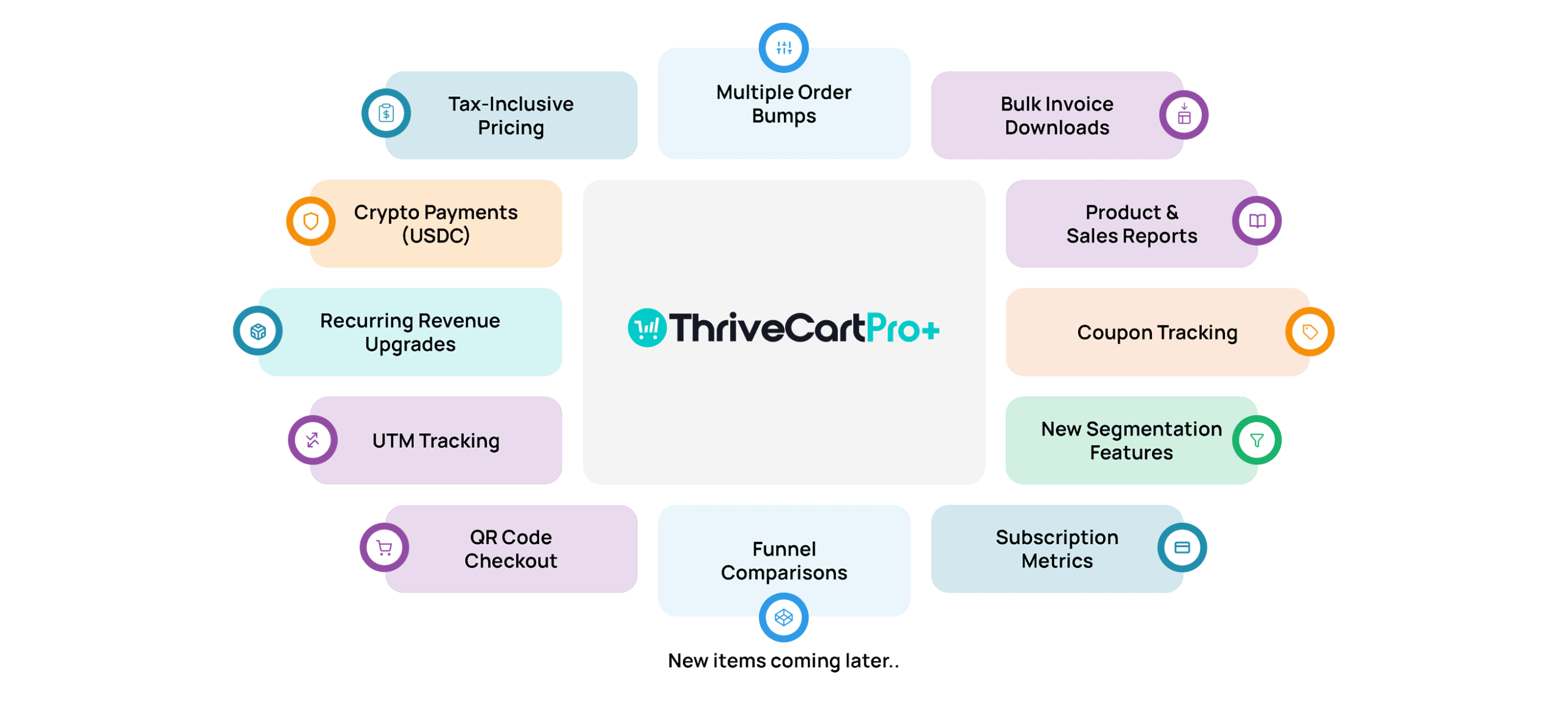
A note on ThriveCart pricing tiers
ThriveCart has three different “bundles” you can choose from, and affects if you’ll pay for it once or as an ongoing subscription:
- ThriveCart Basic: one-time payment of $495USD
- ThriveCart Pro+: Basic plus $295USD annual
- ThriveCart Ultimate: one-time payment of $195USD on top of the Pro+ pricing
Throughout this article, I’ll denote which bundle offers the features I mention. Now, onto why ThriveCart is the best way for Canadian consultants and coaches to sell their digital products:
ThriveCart correctly applies Canadian taxes to your online orders!
My biggest pet peeve as a Canadian consultant selling webinars and courses online is dealing with Canadian taxes. Most U.S.-based cart systems don’t natively support GST/HST/PST calculations. The #1 reason why I love ThriveCart is because it easily calculates the correct tax based on the customer’s billing address at checkout!
How easy? You just tell it what sort of product you’re selling and add in your own address and done.
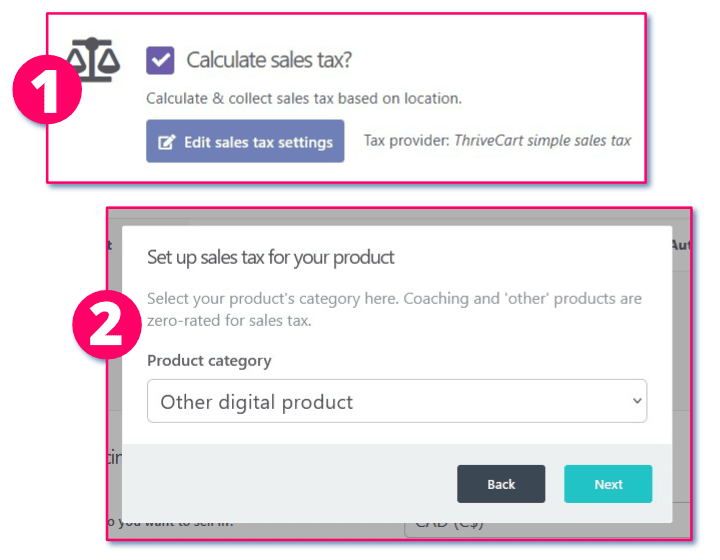
This is a game changer, as I know a lot of colleagues and clients “eat” the tax difference because their online cart can’t calculate it. That means they’re paying their bookkeeper or accountant extra to sort it out later. Meanwhile, Canadian customers get annoyed that they can’t remit the tax on their purchase. ThriveCart is going to save you on accounting fees!
Reminder: no matter if it’s an online webinar, self-paced course, or digital resource, the tax rate is based on the customer’s location, not yours. So while I’m in Nova Scotia, if I sell a digital product to someone in Alberta, I will charge them 5% (Alberta’s rate), not 14% (Nova Scotia’s rate).

Easily add different kinds of ecommerce cart experiences, no matter what your website is built on!
Canadian consultants and coaches don’t want to mess around with complicated ecommerce setups. We also don’t want to waste time wrangling code (either ourselves or for our Virtual Assistants). But we do expect options when it comes to different kinds of checkout experiences. Whether you’re using WordPress, Showit, Squarespace, Webflow, or something else entirely, ThriveCart integrates without a hitch. If you can place HTML/Javascript on your site, you can use ThriveCart.
No matter what your website is built on, ThriveCart gives you three cart options:
- Designed landing pages: When you don’t want to touch your website (or don’t have one), ThriveCart lets you create beautiful, standalone pages for your offers. Copy the landing page link and send to interested prospects!
- Embedded checkout on your website: You can embed the full checkout form directly into a page or post that accepts javascript. Perfect for keeping people on your site while they go through the purchase process.
- Popup on your website: This creates a slick popup overlay when visitors click a button on a page of your site. Useful if you prefer a clean and simple sales page and want the checkout experience to overlay on top only when they’re ready. This is my preferred method with WordPress.
Plus, no matter which of the three you choose above, you can control the entire flow of the checkout experience:
- One-page checkout: All info on a single screen, which is super fast and conversion-friendly.
- Multi-step checkout: Split the form across steps to reduce overwhelm and make the process feel lighter.
- Funnel-style checkout: Ideal for higher-ticket services. You can design a customer journey with upsells, called “bumps”. You could offer a 1:1 call on top of a masterclass, or an ebook to go along with a course, for example. Basic lets you add 1 bump, Pro+ and Ultimate have unlimited bumps and some extra upsell features.
And if you get stuck? The company tripled their customer support team in 2024. The average response time is now 18 minutes, 365 days a year. Super important when you’re 2 hours away from launch and need something addressed fast!

Create, manage, and sell online courses with ThriveCart’s build in Learning Management Software (LMS) called Learn
Selling courses is a great way to diversify your revenue as a Canadian consultant or coach. Since ThriveCart has its own LMS called “Learn” baked into all tiers, with “Learn+” available in Ultimate. Learn+ has a few extra features such as advanced student management, but you can always upgrade later. What I’m getting at is there’s no need for you to bounce back and forth between your eCommerce and LMS solutions. One place to create and manage both saves a ton of time and reduces having to learn too many interfaces.
ThriveCart’s Learn is also easier to use, IMO
Personally, I find ThriveCart’s “Learn” LMS easier to use and manage than Teachable, LearnDash, or Kajabi. That does mean that Learn may lack some specific/advanced bells and whistles compared to the larger LMS. But as a consultant often hired to undo complicated marketing setups, a lot of features missing in Learn are the very ones clients don’t even touch with the larger brands. I say keep things simple, so you can focus on getting your course live and selling.
Some of my favourite features with ThriveCart’s Learn LMS:
- Easy drag & drop course building: drop in text, video links, downloadable, images easily to shape up your course. The interface is lean and simple, and I prefer that.
- Ability to “drip” learning content: Release modules over time to prevent content overwhelm and encourage progress. Learn+ has additional settings.
- Tying course purchases to “bumps”: You can offer bonus lessons, templates, or coaching calls as add-ons during checkout without needing a second system.
- Bundle courses together (Learn+): make it easy to group related courses in one payment system.
- Team seats (Learn+): assign a community manager or VA to manage your learners while you focus on other areas of your business.
ThriveCart has many payment plan options: subscriptions, split payments, and “bumps”
ThriveCart lets you structure your payments in whatever way makes sense for you and your clients. This is especially helpful if you’re selling higher-priced services or longer engagements and want to remove barriers to saying “yes”.
In fact, studies show offering payment plans can boost conversions by 30% or more, and ThriveCart makes that easy. Here are the payment structures you can create:
- Choose different currency per product: if you serve an international audience, you may need to sell different offerings in different currencies. ThriveCart lets you control this at the product level!
- One-time payments: Great for workshops, audits, or mini-courses.
- Payment Plans/Buy Now Pay Later: Spread the cost over 2 to 6 payments.
- Subscriptions: Monthly, quarterly, daily, and more. There’s lots of ways to take recurring payments. Perfect for retainers or membership offers.
- Free trials: Let people try your product/service for a set amount of time before committing.
- Pay-what-you-want: Ideal for donations, sliding-scale offerings, or audience-first pricing. You can set a minimum amount and have specific thankyou messages depending on the amount the customer enters.
- Coupons: it’s easy to set up a specific % or amount of a discount, and how many can be used for how long. You can also control which product to apply them to.
- “Bump” (upsells and downsells): when purchasing your main product, offer upsells such as consulting sessions, resources, or other digital offers.
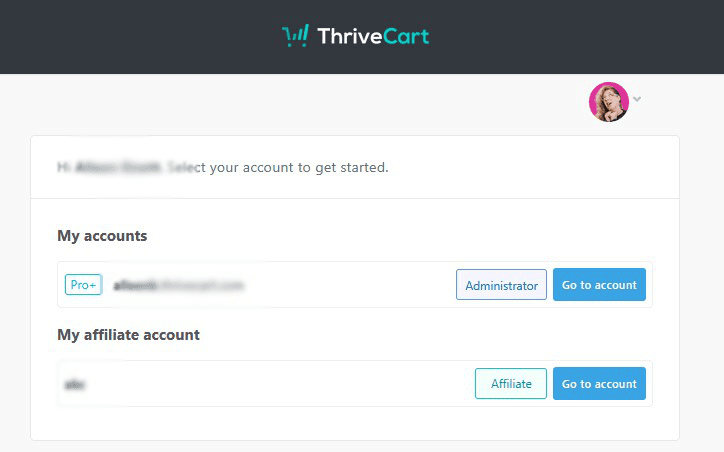
Want to add an affiliate program? ThriveCart already has that built right in!
Goodbye messy spreadsheets and forgotten payouts. You can easily create an affiliate program for your offers and products with ThriveCart. It’s simple to manage and is accessible through the same dashboard you use to sell products. I’ve personally been on the “Affiliate” side of brands that use ThriveCart and can confirm it’s easy to keep track of where I’m at as a partner. The Affiliate program features include:
- Control over the affiliate experience with “rules”: you have a variety of options of what “happens next” after an affiliate applies for your program, is approved, and when they sell specific products and offers.
- Payouts via Stripe or PayPal: Quick, reliable payments to your partners.
- Self-generating affiliate links: Affiliates can grab their links anytime without asking you. They can even generate QR codes with Ultimate!
- Affiliate Area: a dedicated space for affiliates to generate unique links, grab promotional content you’ve provided, and check the status of payouts. Affiliates can even add their own bonuses as part of the post-purchase process to really make the collaboration special for customers and clients.
ThriveCart makes passing customer information over to your email marketing platform easy and stress-free
The relationship with customers doesn’t end with the sale: ThriveCart can automatically send buyer info over to your email marketing platform with automation workflows. I specifically love the simplicity of the tagging system: once you’ve connected your email marketing platform to ThriveCart, you can select tags you’ve created and assign contacts based on what they bought, what country they’re from, or other purchase-related data. No manual sorting required! That way onboarding and follow-up are seamless after purchase, safely managed over on your newsletter platform. ThriveCartPro+ and Ultimate beefs up the experience even more with more advanced workflows.
Here are the following email marketing platform integration built into ThriveCart:
- ActiveCampaign
- Kit
- Klaviyo
- Flowdesk
- Hubspot
- Infusionsoft
- Mailchimp
- MailerLite
- Sendly
If your platform isn’t listed (for example, I’m with CyberImpact), you can set up Zapier to handle the exchange.
ThriveCart is the perfect ecommerce solution for Canadian consultants and coaches who want to sell services and products online easily.
ThriveCart makes running an online Canadian service-based business easier, not harder. Whether you’re offering services, digital products, or online training, it’s one of the most powerful and flexible platforms on the market today. It’s especially great if:
- You want to charge the right Canadian tax with zero effort.
- You want flexibility in how your price and sell digital products without getting armpits deep in code.
- You want to add online courses or affiliate programs to your eCommerce without adding more subscriptions and platforms to your tech stack.
Sounds like cart solution you’ve been waiting for? Check out ThriveCart, and see if it’s the right fit.